
How to Use ChatGPT for Customer Service
Quick Answer
To use ChatGPT for customer service, start with internal drafting: paste the customer email plus a role, context, task, and constraint prompt, then have a human review before sending. Add triage and sentiment routing as you grow. If you build a customer-service business for others, form an LLC for $39 with Northwest.
Introduction
I still remember the exact moment I realized my ways to manage my online business was broken. I was running an online training business. I spent 14 hours a week writing articles, facebook posts, answer comments, and emails.
That was when I started experimenting with artificial intelligence. I did not want a clunky, robotic chatbot that made my customers angrier. I wanted a smart, reliable way to handle the repetitive work so I could focus on the complex issues that actually required human empathy.
Learning how to use ChatGPT for creating content, for customer service or for marketing and social media completely changed the trajectory of my business. It allowed me to respond to inquiries in minutes instead of days, publish more regularly without spending time and money. More importantly, it gave me more time for myself, my spiritual life and for my son.
If you want to offer this kind of AI-powered service to other businesses, set yours up properly first. You can form your LLC for $39 with Northwest.
Form Your LLC for $39 with Northwest →Lowest 3-year cost we found: Northwest $289 vs Bizee $298 vs ZenBusiness $497 (service fees; state fees extra). Northwest also puts its address on your public filings instead of yours where the state allows.
If you are a business owner staring down a growing pile of support
tickets, you are in the right place. This guide is not about replacing
your human team with robots. It is about giving your team superpowers. I
am going to show you exactly how to implement this technology safely,
affordably, and effectively. We will cover real costs, timeframes,
practical examples, and the harsh realities of what happens when you get
it wrong.
Let us get to work.
Why This Matters in 2026
Customer expectations have shifted dramatically. According to data
from the Bureau of Labor Statistics, the cost of employing
administrative and customer service support staff has risen steadily
over the last decade. At the same time, consumers now expect
near-instantaneous responses. A study cited by the U.S. Census Bureau on
business operations indicates that companies failing to meet basic
digital service expectations lose a significant portion of their
recurring revenue to competitors who do.
In 2026, artificial intelligence is no longer a novelty. It is a
baseline operational requirement. Your competitors are already using AI
to draft emails, summarize long customer complaints, and answer basic
questions at two in the morning. If you are still doing everything
manually, you are operating at a severe disadvantage.
However, the conversation has matured. We are no longer asking if AI
works. We are asking how to use it without sounding like a soulless
corporation or accidentally promising a customer a refund that does not
exist. The businesses winning right now are the ones using AI to handle
the mundane tasks, thereby freeing up their human staff to provide the
high-quality, empathetic support that actually builds brand loyalty.
If you are thinking bigger, this same skill can become a business. Many operators now set up AI customer-service systems for other companies as a paid service. The moment you do that, you need an LLC to protect yourself, and the service I recommend is Northwest Registered Agent.
Form Your LLC with Northwest for $39 →
Financial realism is critical here. You do not need a massive budget
or a team of software engineers to make this work. You just need a clear
strategy, a few dollars a month for software subscriptions, and the
discipline to keep a human in the loop.
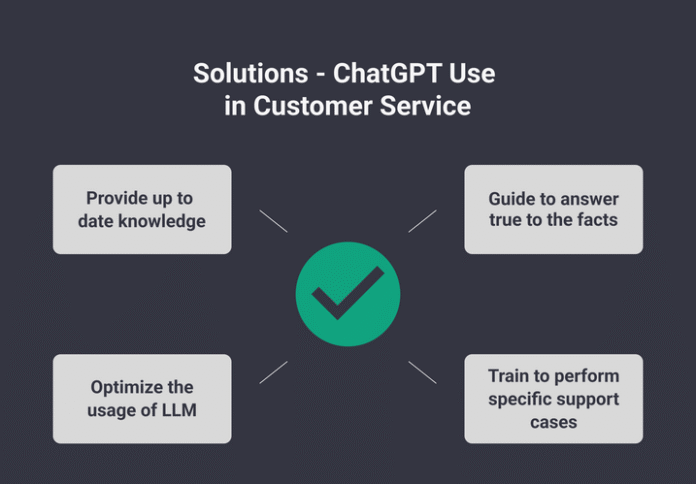
To make this actionable, I have broken down the three most effective
ways to use this technology for customer support. For each, I have
included the estimated startup costs, time to launch, difficulty rating,
pros, cons, and a real-world example.
Use Case 1: The
24/7 Triage and FAQ Assistant
This is the most common and immediately valuable application. Instead
of letting ChatGPT talk directly to your customers, you use it to
instantly draft responses to common questions based on your company’s
specific knowledge base. You, or your support agent, review the draft
and hit send.
- Estimated Startup Cost: $20 to $50 per month. This
covers a ChatGPT Plus subscription or a basic API integration tool like
Zapier combined with OpenAI. - Time to Launch: 3 to 7 days.
- Difficulty Rating: 2 out of 5. You only need to
know how to copy, paste, and edit text.
Pros:
- Drastically reduces response time for common inquiries.
- Ensures consistent branding and tone across all replies.
- Frees up hours of manual typing for your team.
Cons:
- Requires a human to review the output to prevent factual
errors. - Struggles with highly complex, multi-layered customer issues.
Who it is best suited for: Small to medium
businesses with a high volume of repetitive questions, such as
e-commerce stores, SaaS companies, or local service providers.
Real-World Example: I worked with a local HVAC
company that received dozens of emails every week asking, “How often
should I change my air filter?” and “Do you service my zip code?” We set
up a simple system. The office manager would paste the incoming email
into ChatGPT along with a predefined prompt containing the company’s
service areas and maintenance guidelines. ChatGPT would generate a
polite, accurate, and branded response in three seconds. The manager
would glance at it, add the customer’s name, and send it. What used to
take 10 minutes per email was reduced to 30 seconds.
Use
Case 2: The Email Drafting and Ticket Resolution Copilot
This takes the concept a step further. Instead of just answering
FAQs, you use the AI to read long, angry, or confusing customer emails
and draft a professional, empathetic resolution.
- Estimated Startup Cost: $20 to $100 per month. You
might need a slightly more robust tool that integrates directly with
your helpdesk software, such as Front, Zendesk, or a dedicated AI
writing assistant. - Time to Launch: 1 to 2 weeks.
- Difficulty Rating: 3 out of 5. Requires setting up
basic integrations and refining your prompts.
Pros:
- De-escalates angry customers by removing human emotion from the
initial drafting phase. - Helps non-native English speakers on your team communicate
flawlessly. - Summarizes long email threads instantly so agents know the context
immediately.
Cons:
- If the prompt is poorly written, the AI might agree to unreasonable
customer demands. - Requires strict oversight to ensure company policies are not
violated.
Who it is best suited for: B2B companies, agencies,
or any business where customer inquiries are long, detailed, and require
nuanced, professional communication.
Real-World Example: A digital marketing agency I
consulted for had a support agent who was excellent at technical work
but struggled with writing professional, empathetic emails to frustrated
clients. We implemented a rule: before sending any difficult email, the
agent had to paste the client’s message into ChatGPT with a specific
prompt asking for a “polite, professional, and solution-oriented
response that offers a 15-minute discovery call.” The agent would then
tweak the output. Client satisfaction scores rose by 22 percent in two
months because the communication became consistently professional and
calm.
Use Case 3:
Sentiment Analysis and Automated Routing
This is a more advanced but highly effective use case. You can use
the AI to read incoming messages, determine the customer’s emotional
state (sentiment), and automatically tag or route the ticket to the
right person.
- Estimated Startup Cost: $50 to $200 per month. This
usually requires an API-based workflow using tools like Make or Zapier
to connect your email inbox to the OpenAI API. - Time to Launch: 2 to 4 weeks.
- Difficulty Rating: 4 out of 5. Requires some
technical comfort with automation tools and API keys.
Pros:
- Urgent or angry tickets are flagged immediately for priority
handling. - Reduces the mental load on support staff who no longer have to
manually sort through hundreds of emails. - Provides valuable data on overall customer satisfaction trends.
Cons:
- Setup can be technically frustrating for non-technical
founders. - API costs can scale up if you have massive email volume, though it
remains cheaper than human labor.
Who it is best suited for: Growing businesses with
at least two or three support staff members who are drowning in an
unorganized, shared inbox.
Real-World Example: An online software company was
missing critical bug reports because they were buried under hundreds of
“how do I reset my password” emails. We built a simple automation. Every
time an email hit the support inbox, the API sent the text to ChatGPT
with the instruction: “Analyze this email. If it mentions ‘bug’,
‘error’, or ‘broken’, tag it as URGENT-TECH. If it is a general
question, tag it as STANDARD.” The urgent tickets were instantly
highlighted in red for the lead developer. Critical issues were resolved
60 percent faster.
Step-by-Step
Guide to Writing Effective Prompts
The secret to knowing how to use ChatGPT for customer service lies
entirely in the prompt. A bad prompt yields a generic, useless response.
A great prompt yields a ready-to-send email.
Here is the exact framework I use, which I call the “Role, Context,
Task, Constraint” method.
- Role: Tell the AI who it is. (e.g., “You are an
expert, empathetic customer support specialist for a premium coffee
subscription company.”) - Context: Give it the background information. (e.g.,
“Our shipping partner is currently experiencing a 3-day delay due to
severe weather. We offer a 100 percent satisfaction guarantee.”) - Task: Tell it exactly what to do. (e.g., “Draft a
reply to a customer who is angry that their order has not
arrived.”) - Constraint: Set the boundaries. (e.g., “Keep the
response under 150 words. Do not promise a specific delivery date. Offer
a 15 percent discount code for their next order as an apology. Use a
warm, professional tone.”)
If you provide this level of detail, the output will be remarkably
close to perfect every single time.
If you plan to offer this as a service to other businesses, set your company up properly first. You can form your LLC for $39 with Northwest.
Start Your LLC for $39 with Northwest →
Common Mistakes
First-Time Adopters Make
I have watched many business owners rush into this technology and
immediately shoot themselves in the foot. Avoid these critical
errors.
Mistake 1: Letting the AI Talk Directly to Customers Without
Oversight This is the fastest way to destroy your brand
reputation. AI can hallucinate. It can confidently invent a refund
policy that does not exist or promise a feature your product does not
have. I once saw a business owner set up an auto-responder that promised
a full refund to anyone who used the word “unhappy.” They lost thousands
of dollars in a single weekend. Always keep a human in the loop to
review and approve the final message.
Mistake 2: Feeding It Sensitive Customer Data You
must be incredibly careful about data privacy. Do not paste customer
names, credit card numbers, addresses, or confidential business data
into a public AI chat interface. The terms of service for standard AI
models often state that the data you input may be used to train future
models. If you must process sensitive data, you need to use an
enterprise-grade API setup that guarantees data privacy, or anonymize
the data by replacing names with “[Customer Name]” before pasting.
Mistake 3: Using Generic, One-Size-Fits-All Prompts
If you just type “Write a nice reply to this email,” the AI will
generate a bland, robotic response that sounds exactly like every other
AI-generated email on the internet. Customers can smell this from a mile
away. You must inject your specific company voice, your specific
policies, and your specific constraints into every prompt.
Mistake 4: Ignoring the Metrics You cannot improve
what you do not measure. If you implement AI support tools, you must
track your Customer Satisfaction Score (CSAT), your average response
time, and your resolution rate. If those numbers go down after you
implement AI, your system is broken, and you need to adjust your prompts
or your workflow immediately.
My Recommendations for
Implementation
If you are ready to move forward, here is my exact, step-by-step
recommendation for rolling this out in your business without causing
chaos.
Step 1: Start with Internal Drafting Only Do not
automate anything yet. For the first two weeks, have your support team
use ChatGPT purely as a drafting tool. They read the customer email,
paste it into the AI with a good prompt, review the output, edit it for
accuracy, and send it manually. This builds your team’s confidence and
helps you refine your prompts without any risk of an AI disaster going
out to a client.
Step 2: Build a “Prompt Library” Do not make your
team guess how to prompt the AI every time. Create a shared document
with pre-written prompts for your top 10 most common scenarios. Include
prompts for:
- Apologizing for a shipping delay.
- Explaining a return policy.
- Escalating a technical issue.
- Responding to a positive review. Having these ready to copy and
paste ensures consistency and saves time.
Step 3: Implement the “Two-Eye” Rule For the first
three months of using AI in your workflow, mandate that no AI-generated
response goes to a customer without being read by a second human being.
This catches hallucinations, tone issues, and policy violations before
they become problems.
Step 4: Gradually Automate the Boring Stuff Once
your team is comfortable and your prompts are dialed in, look at
automating the lowest-risk tasks. Setting up an auto-responder that uses
AI to summarize the customer’s issue and route it to the correct
department is a safe, high-value first step into true automation.
Step 5: Audit Your Costs and Savings After 90 days,
sit down with your numbers. Calculate how many hours of manual typing
you saved. Compare the cost of your AI subscriptions and API usage
against the cost of the alternative, which would be hiring another
part-time employee. You will likely find that the return on investment
is overwhelmingly positive.
When to Form an LLC
Before you file, it helps to understand how to form an LLC step by step, what it will cost in your state, and which formation service is best. If you freelance or consult, see our guide to an LLC for freelancers and consultants.
You might be wondering how business structure ties into customer
service technology. It ties in deeply when it comes to liability and
professionalism.
If you are a solo freelancer testing the waters, you might operate as
a sole proprietor. However, the moment you start using AI to handle
customer service at scale, you are interacting with the public, managing
customer data, and making commitments on behalf of a business entity.
This is the exact moment you should form a Limited Liability Company
(LLC).
Here is why forming an LLC makes sense in this context:
- Liability Protection: If your AI system
accidentally gives a customer terrible advice that leads to financial
loss, or if a data handling error occurs, an LLC helps separate your
business liabilities from your personal assets. Your personal house,
car, and savings are shielded from business lawsuits. - Professional Credibility: When you are dealing with
vendors, API providers, or B2B clients, having “LLC” after your business
name signals that you are a legitimate, established operation, not just
a hobbyist. - Data Privacy Compliance: As your business grows,
you may fall under regulations like the GDPR or CCPA, which govern how
you handle customer data. Operating as a formal LLC forces you to take
these compliance issues seriously, establish proper privacy policies,
and protect your customers’ information.
If you are building an agency that provides AI customer service setup
to other businesses, an LLC is absolutely mandatory from day one. You
are entering into contracts and handling third-party data. Do not expose
your personal finances to that level of risk. The cost to form an LLC
typically ranges from $50 to $500 depending on your state, which is a
tiny fraction of the protection it provides.
Do not expose your personal finances to that level of risk. You can create your LLC in a few clicks with Northwest.
Create Your LLC with Northwest →
Final Thoughts
Learning how to use ChatGPT for customer service is not about
replacing the human element of your business. In fact, it is the exact
opposite. It is about removing the robotic, repetitive, soul-crushing
tasks from your plate so that you and your team can actually be human.
When your support staff is not spending three hours a day typing
“Your tracking number is X,” they have the time and mental energy to
actually listen to a frustrated customer, solve a complex problem, and
turn a detractor into a lifelong advocate. That is where real business
growth happens.
Start small. Pick one repetitive task this week. Write a detailed
prompt for it. Test it internally. Measure the results. You do not need
a massive budget or a technical degree to make this work. You just need
the willingness to adapt and the discipline to keep a human firmly in
control of the process.
The technology is ready. The question is whether you are ready to use
it wisely.
Ready to turn your idea into a real, protected business?
Northwest Registered Agent files your LLC for $39 + state fee, including a free year of registered agent service, business address privacy, and everything you need to look professional from day one.
- AI Marketing Prompts for Local Businesses
- Best AI Tools for Small Business Owners
- AI Tools That Save 10+ Hours Per Week
- AI Business Ideas for Solopreneurs (2026)
Sources
To ensure the information in this guide is grounded in reality and
reliable data, I rely on the following authoritative sources. I
encourage you to review these directly for the most current regulations
and economic data.
- U.S. Small Business Administration (SBA.gov)
Reference: The SBA provides extensive guides on business
technology adoption, data security best practices for small businesses,
and the fundamentals of protecting your business through proper legal
structuring, such as forming an LLC.
Link: sba.gov/business-guide - Internal Revenue Service (IRS.gov)
Reference: IRS guidelines on deducting ordinary and necessary
business expenses, which includes software subscriptions, API costs, and
technology tools used for customer service and operations.
Link: irs.gov/businesses/small-businesses-self-employed - U.S. Bureau of Labor Statistics (BLS.gov)
Reference: Occupational Employment and Wage Statistics (OEWS).
This data provides clear insights into the rising costs of employing
administrative and customer service representatives, highlighting the
financial incentive for businesses to seek efficiency through
technology.
Link: bls.gov/oes - U.S. Census Bureau (Census.gov)
Reference: Annual Business Survey (ABS) data, which tracks
technology adoption rates and operational challenges among small
businesses in the United States, providing macroeconomic context on
digital transformation.
Link: census.gov/programs-surveys/abs - Federal Trade Commission (FTC.gov)
Reference: The FTC provides critical guidelines on data
privacy, truth in advertising, and the responsible use of automated
systems and AI. They explicitly warn businesses against using AI to
deceive consumers or mishandle personal data.
Link: ftc.gov/business-guidance
Disclaimer: I am an entrepreneur and business consultant, not a
lawyer or a certified public accountant. The information provided in
this article is for educational purposes based on my professional
experience and publicly available government data. Always consult with a
qualified attorney or tax professional in your specific state before
making final legal, structural, or financial decisions regarding your
business.